Documentation Index
Fetch the complete documentation index at: https://docs.latitude.so/llms.txt
Use this file to discover all available pages before exploring further.
Sessions
A session is an optional grouping of related traces into a multi-turn conversation. While spans and traces are always present (they’re part of the OpenTelemetry standard), sessions only exist when your application provides asession_id with its telemetry. They let you view the full conversation arc across multiple interactions.

How Sessions Work
Sessions are formed when your application provides asession_id with its telemetry. All traces sharing the same session ID are grouped together chronologically.
A session might look like:
- Trace 1: User asks “What’s the weather?”. The agent responds with current weather
- Trace 2: User asks “What about tomorrow?”. The agent responds with the forecast
- Trace 3: User asks “Should I bring an umbrella?”. The agent gives a recommendation
Viewing Sessions
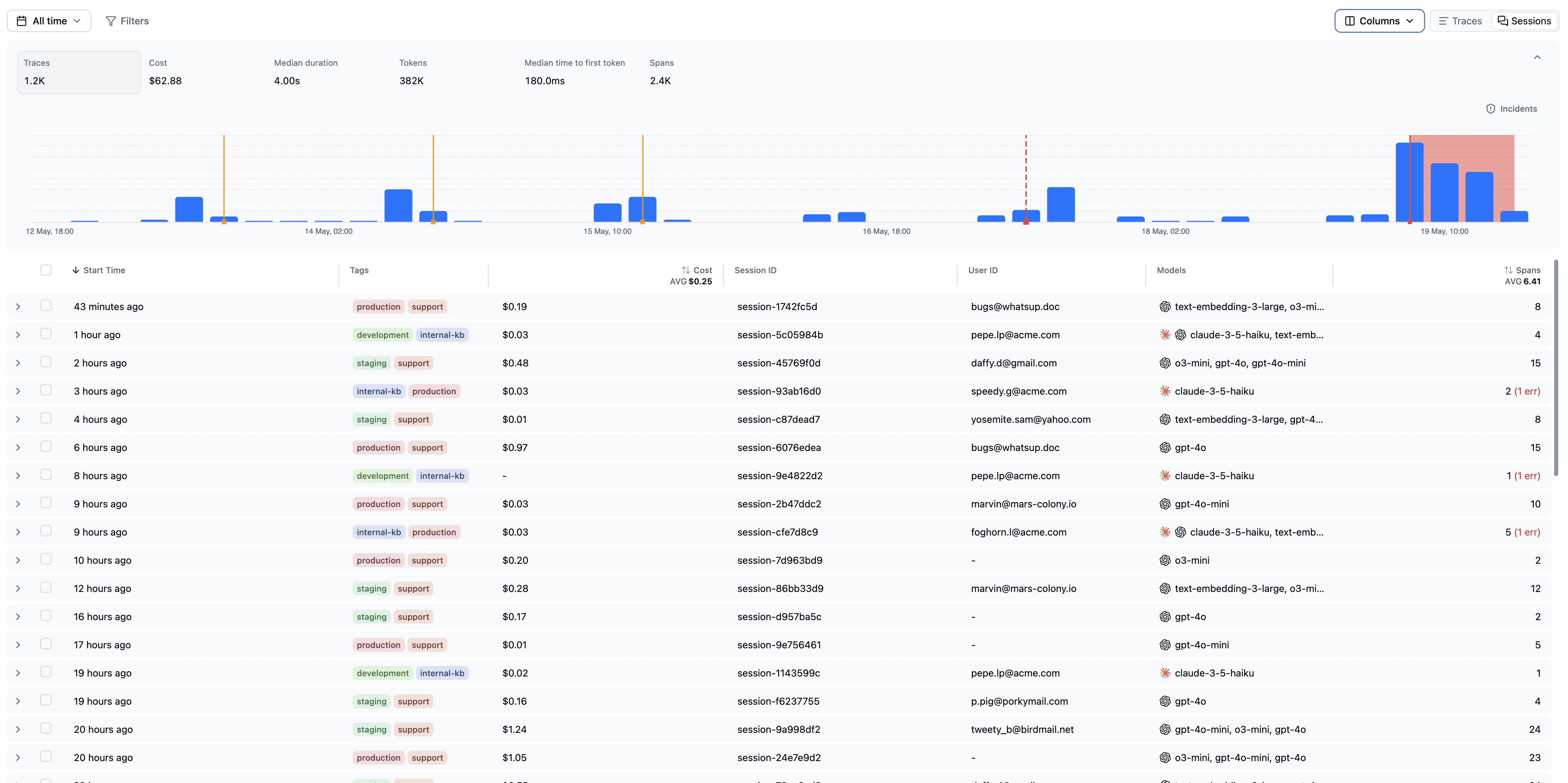
Toggle between Traces and Sessions using the switcher in the top right of the observability page. The sessions view shows:- Expandable session rows: Click a session to reveal all traces within it
- Start time: When the session began
- Name: The trace name (from
pathin yourcapture()call) - Duration: Total duration across all traces in the session
- Time to First Token: Median TTFT across the session’s traces
- Cost: Aggregated cost across all traces
- Session ID: The identifier your application provided
- User ID: The end user, if provided via telemetry metadata
- Models: Which LLM models were used across the session
- Span count: Total spans across all traces
Why Sessions Matter
Sessions enable:- Conversation-level evaluation: Evaluations can target session-level interactions, not just individual turns. This catches problems like context loss, contradiction, and conversational drift.
- Session-level score aggregation: Roll up scores across an entire conversation to see overall quality, not just per-turn results.
- Richer issue context: When drilling into issues, seeing the full session context helps understand failure patterns that only emerge across multiple turns.
Sending Session IDs
To group traces into sessions, pass asession_id when capturing telemetry:
- TypeScript
- Python
capture() call with the same session_id will be grouped into the same session.
Sessions in Search and Annotations
Search, annotations, and most reliability features operate at the trace level. Sessions are an aggregation on top of traces, not a separate primitive. When you encounter a session in the product (for example, by clicking a session in the sessions view), Latitude opens the session’s most recent trace and shows the full conversation derived from every trace sharing the session ID. You can:- Run a saved search scoped to
sessionIdto track every trace in a specific conversation. - Annotate any individual trace within the session from its detail view — the conversation context spans the full session, so annotators see the whole arc, not just one turn.
- Filter analytics by session-derived properties when you want session-level rollups instead of per-turn metrics.
Next Steps
- Traces: The individual interactions that make up a session
- Search: Find traces (including session-scoped ones)
- Scores: How scores attach to traces and sessions
- Evaluations: Configuring evaluations to target sessions